
CRM Software for Small Business in India
Digital Hanshu CRM keeps every lead, follow-up, quotation, invoice, agreement and payment in one simple app – made for how Indian businesses actually sell: on WhatsApp, on the phone and on the move.
- Works on phone & computer – install it like an app
- GST quotations & invoices with UPI QR
- One-tap WhatsApp follow-ups, every day
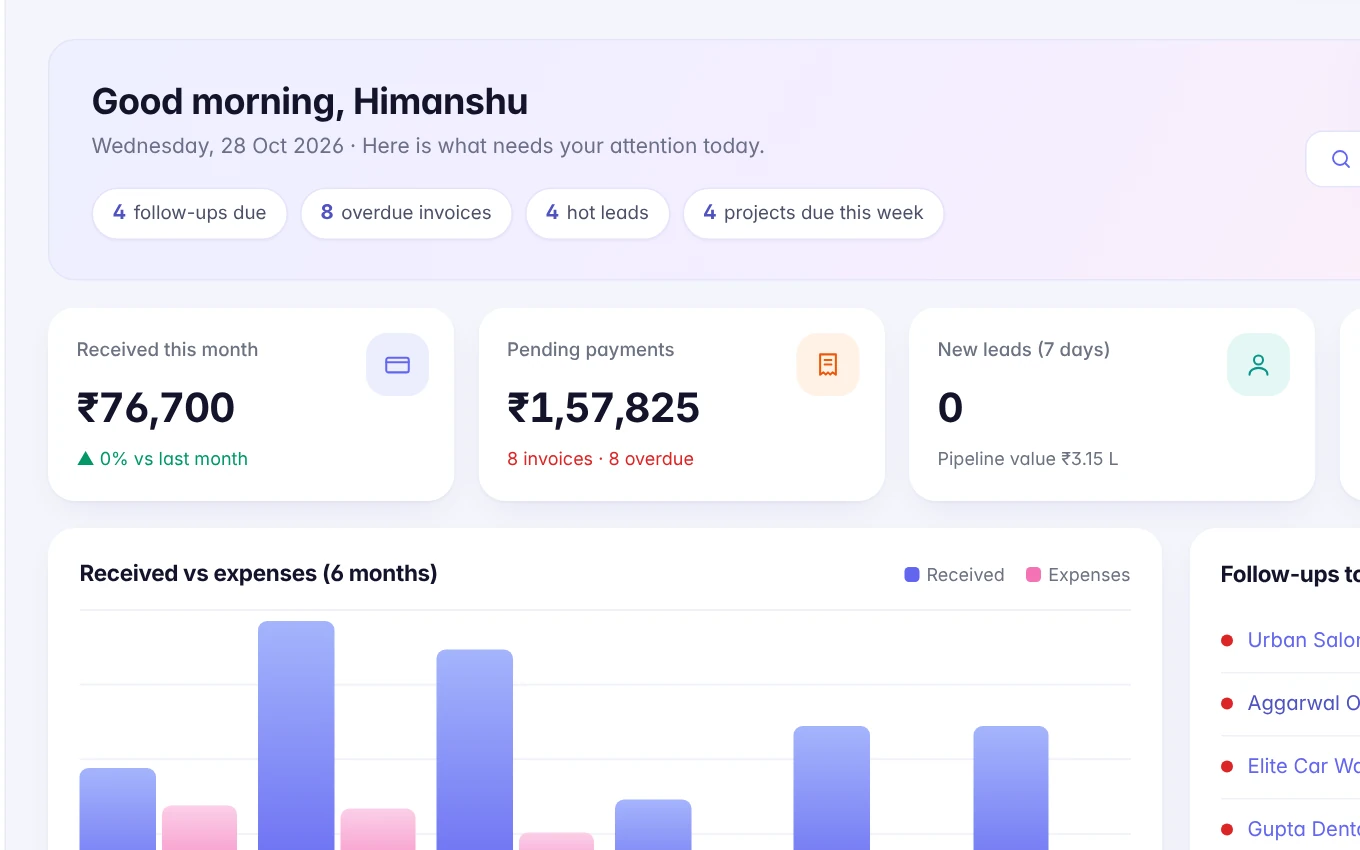
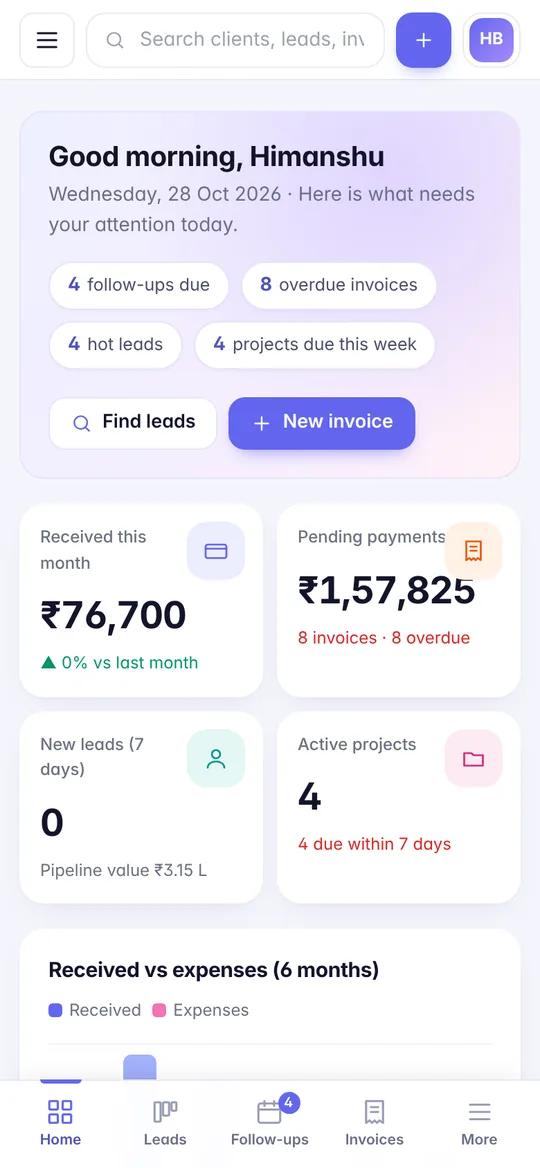
See Digital Hanshu CRM in action
These are real screens from the CRM. Tap any screen to enlarge.

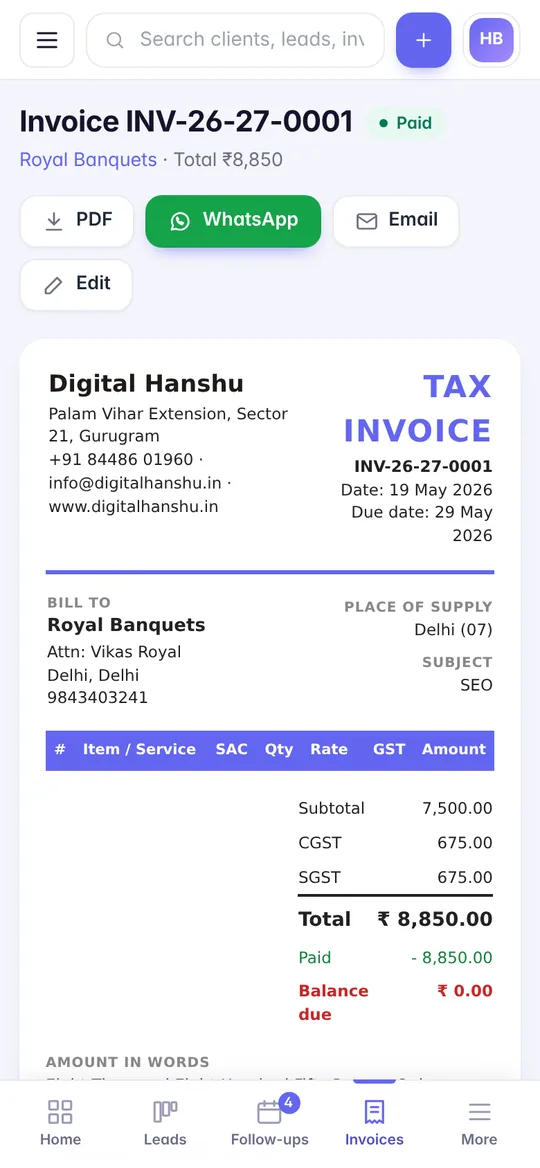

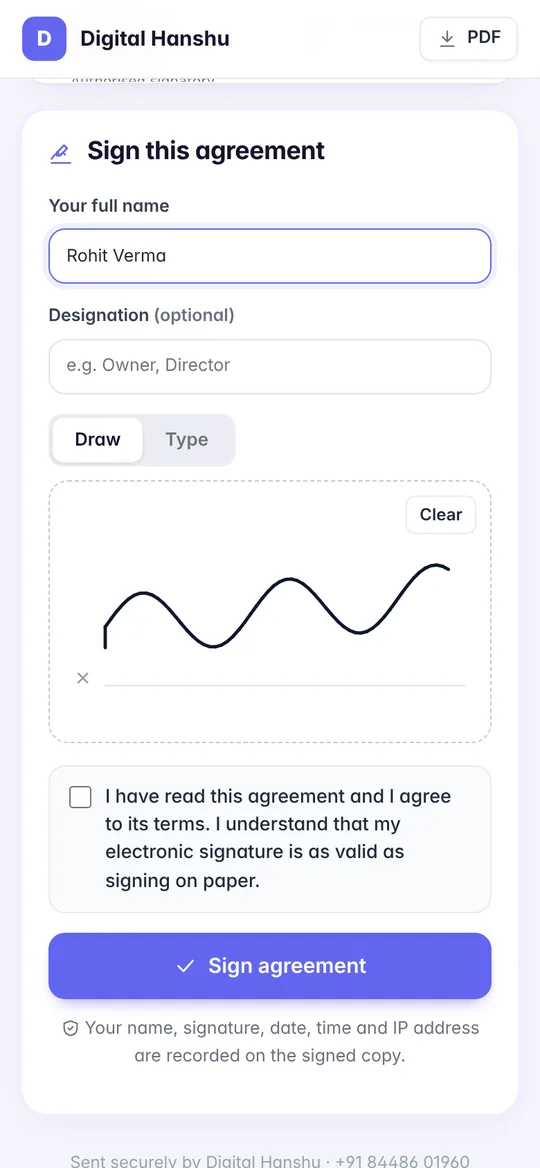
Everything from first enquiry to final payment
Lead Finder
Search Google Maps for businesses in any area, see which ones have no website or few reviews, and get a ready WhatsApp pitch with a free audit.
Leads & pipeline
Drag-and-drop board from New to Won, lead sources, scores, owners and next follow-up date for every lead.
WhatsApp follow-ups
A daily list of who to contact, with your own message templates. One tap opens WhatsApp with the message ready.
GST quotations
Professional quotations with your logo. Clients open a link, download the PDF and accept online.
GST invoices & UPI QR
CGST/SGST/IGST calculated automatically, bank details and a UPI QR on every invoice, plus recurring monthly invoices.
E-sign agreements
Send agreements from ready templates. Clients sign on their phone; you get a signed PDF with time and IP record.
Payments & reports
Payments received, pending dues, expenses, profit and lead-to-client conversion at a glance.
Projects & tasks
Track work for every client with checklists, deadlines and team assignments.
Team & roles
Admin, manager, sales and accounts roles so everyone sees only what they need.
Website lead capture
Enquiries from your website and ad landing pages arrive in the CRM automatically as new leads.
Installable app
Add it to your phone or desktop home screen – opens full-screen like a native app.
Secure cloud
Encrypted logins, login protection, daily backups and your data stays yours.
Made for service businesses and agencies
Customised for your business
Because we build the CRM ourselves, we can add the fields, reports, workflows and integrations your business needs – or connect it to your website, app and accounting.
Book a free CRM demo
We will show it live on a video call
Why CRM software for small business in India needs to be different
Most well-known CRMs were designed for large sales teams that work mainly through e-mail. A typical Indian small business works differently. Enquiries arrive from a phone call, a Google Maps listing, an Instagram message, a website form or a referral on WhatsApp. The owner often handles sales personally, quotes are sent as PDFs on chat, and payment is collected by UPI or bank transfer. CRM software for small business in India has to fit this reality, or the team simply goes back to their notebook and phone contacts.
Digital Hanshu CRM was built around this way of working. Every feature starts from a simple question: what does a busy owner or salesperson need to do next, and how can they do it in one tap from their phone?
Lead management software that starts before the enquiry
Good lead management software does more than store names. It tells you where each lead came from, what stage it is at, who owns it and when it needs attention. In Digital Hanshu CRM, leads from your website arrive automatically through the lead capture API, while leads from calls and walk-ins can be added in seconds. They then move across a Kanban pipeline – from new, to contacted, to quotation sent, to won or lost – so you can see your whole sales picture on one screen.
The Lead Finder goes one step further for businesses that sell to other businesses. You can search Google Maps listings in any area and category, spot businesses that have no website or only a few reviews, and generate a free website audit to open the conversation. It is especially useful for agencies, consultants and B2B service providers looking for their next set of prospects.
A CRM with WhatsApp integration built for daily follow-ups
Most deals are not lost because the customer said no; they are lost because nobody followed up. A CRM with WhatsApp integration fixes this by turning follow-ups into a daily habit. Each morning, the CRM shows the list of leads due for contact. You choose one of your saved message templates, tap once, and WhatsApp opens with the message ready to send. There is no copying numbers or typing the same message again and again, and the follow-up date moves forward once you have made contact.
GST invoice software inside your sales CRM
Many small businesses use one app for leads, another for quotations and a third for invoices, and the details get typed three times. Digital Hanshu CRM works as a sales CRM for India and as simple GST invoice software in the same place:
- Create GST quotations from a lead and convert an accepted quote into an invoice.
- CGST, SGST and IGST worked out based on the place of supply, with your bank details and a UPI QR printed on the invoice.
- Recurring invoices for retainers, AMCs, subscriptions and monthly fees.
- Record part and full payments, track pending dues and log business expenses.
- Send agreements for e-signature through a share link – clients can draw or type their signature on their phone.
Once a deal is won, projects and tasks help your team deliver the work, and reports show money in and money out, profit and which lead sources bring real clients. Team roles keep things organised: sales staff see their leads, accounts staff see invoices and payments, and the owner sees everything.
If you are still deciding whether you need a CRM at all, our article on why a small business needs a CRM covers the common signs.
How different businesses use Digital Hanshu CRM
The core is the same; the way each team uses it changes. Book a free demo to see it set up for your industry.
CRM for real estate
Property enquiries come from portals, site boards and ads, and buyers take weeks to decide.
- Capture ad and website enquiries automatically
- Pipeline stages for site visit, negotiation and booking
- Scheduled WhatsApp follow-ups so no buyer goes cold
- See which source brings bookings, not just calls
CRM for agencies & consultants
Agencies, CA firms and consultants need to find clients, send proposals and bill every month.
- Lead Finder with a free website audit for prospecting
- GST quotations and e-signed service agreements
- Recurring invoices for monthly retainers
- Projects and tasks for client delivery
CRM for coaching & clinics
Coaching institutes and clinics handle many enquiries that need a quick, polite reply.
- Website and ad enquiries land in one list
- Template messages for batch details, fees or appointments
- Invoices with UPI QR for fees and packages
- Front desk and owner roles with the right access
Spreadsheets and WhatsApp vs a proper CRM
Excel sheets and WhatsApp chats are a natural place to start, and for a handful of leads they work. As enquiries grow, the gaps start to cost you business. Here is an honest comparison.
| Task | Spreadsheet + WhatsApp | Digital Hanshu CRM |
|---|---|---|
| Recording new leads | Typed in by hand, often later or not at all | Website leads arrive automatically; others added in seconds |
| Knowing who to follow up today | Depends on memory or reminders on one phone | Daily follow-up list with one-tap WhatsApp templates |
| Sales stage of each lead | A status column that is rarely updated | Visual Kanban pipeline anyone on the team can update |
| Quotations & invoices | Separate Word, Excel or billing app; details retyped | GST quotation converts to invoice with UPI QR |
| Agreements | Printed, signed, scanned and sent back | E-sign through a share link on the client’s phone |
| When a salesperson leaves | Their chats and contacts may leave with them | Lead history stays in the business account |
| Reports | Built by hand when someone has time | Income, expenses, profit and lead sources on demand |
Choosing the best CRM for small business is less about the longest feature list and more about what your team will actually open every day. Because it installs as an app on phone and desktop, Digital Hanshu CRM is quick to open between calls. And because we build it ourselves, it can be extended with your own fields or workflows – the same approach we take in custom software development. Our comparison of custom software vs ready-made tools explains when each makes sense.
Serving Gurugram, Delhi NCR & all of India
Digital Hanshu CRM runs in the cloud, so your team can use it wherever they are.
On-site help in NCR
For teams in Gurugram, Delhi, Noida, Ghaziabad and Faridabad, we can visit to set up the CRM and train your sales and accounts staff in person.
Remote setup across India
Businesses in Pune, Hyderabad, Chennai, Chandigarh and beyond get the same setup and training over a video call, with support on WhatsApp.
Connected to your website
Pair the CRM with a new business website so every enquiry flows straight in. See our work in the portfolio.
Frequently asked questions
Is Digital Hanshu CRM made for Indian businesses?
Yes. It supports GST (CGST/SGST/IGST), UPI QR on invoices, Indian number formats and WhatsApp-first follow-ups.
Does it work on mobile?
Yes. It works in any browser and can be installed on Android, iPhone and desktop like an app.
Can my website enquiries come into the CRM?
Yes. Website forms, landing pages and automation tools can send leads to the CRM automatically using a secure API token.
Can I try it before buying?
Yes. Book a free demo and we will set up a trial workspace for your business.
Is my data safe?
Your data is kept in a separate workspace, protected by encrypted passwords, login-attempt limits and regular backups. You can export your data anytime.
Which CRM is best for a small business in India?
The best CRM is the one your team will use every day. For most Indian small businesses that means it should work well on a phone, support WhatsApp follow-ups, handle GST quotations and invoices, and be simple enough to learn in an afternoon. Shortlist two or three options, try them with real leads for a week, and choose the one your team naturally keeps open.
Can I import my existing leads from Excel or Google Sheets?
Yes. If your leads are in Excel, Google Sheets or a phone contact export, we can help bring them into Digital Hanshu CRM during setup, including names, phone numbers, sources and notes. It is a good moment to clean up duplicates and old entries, so you start with a tidy pipeline. Mention this when you book your free demo.
Does the CRM send WhatsApp messages automatically?
Digital Hanshu CRM prepares your follow-ups for you: it lists who to contact each day and opens WhatsApp with your chosen template already filled in, so sending takes one tap. You still press send yourself, which keeps conversations personal and avoids messages going out at the wrong moment. It works with the normal WhatsApp or WhatsApp Business app on your phone.
Is a CRM useful for a business with only one or two people?
Yes. Small teams often benefit the most, because the owner is doing sales, quotes, billing and delivery at the same time. A CRM keeps the follow-up list, quotations, invoices and pending payments in one place, so fewer things slip through the cracks. As the business grows, you can add team members and give each one the right role.
Can Digital Hanshu CRM be customised for my industry?
Yes. Because we build and maintain the CRM ourselves, we can add custom fields, pipeline stages, report views or integrations that match how your business works – for example property details for real estate or batch information for coaching. Larger changes are scoped and quoted separately, and our custom software team handles them.
See the CRM in action
A 20-minute demo on video call – we will show how it fits your business.